01 / VEHICLE QA / OPERATIONAL PRODUCT DESIGN
Turning a fragmented vehicle operation into one connected workflow.
Vehicle QA is an internal tracking product designed to centralize the journey of newly acquired vehicles—from arrival and inspection through repairs, approvals and final preparation for sale.
By connecting status, responsibility and operational information in one experience, teams gained a clearer view of what was happening with each vehicle and what needed to happen next.
Status.
Responsibility.
Progression.
02 / THE CHALLENGE
The vehicles were moving.
The information wasn’t.
The operation depended on tools that were never designed around the actual vehicle lifecycle. Updates, images, repair information and responsibilities were distributed across conversations, tables and different people.
The challenge was to connect the physical journey of a vehicle with the information teams needed to make decisions—not simply organize more data.
Fragmented information
Updates spread across tools, conversations and records.
Limited visibility
Understanding status meant piecing together multiple sources.
Unclear ownership
Responsibility and required actions needed to stay visible between stages.
03 / UNDERSTANDING THE OPERATION
Different roles.
One vehicle lifecycle.
Each role interacts with a different part of the operation. Everyone needs to understand the same vehicle lifecycle, with information and control appropriate to the decisions they make.
01Inspection / intake
Arrival · Initial condition · Identification · Inspection status
Establish the vehicle’s starting point
02Repair / operations
Repairs · Maintenance · Parts · Progress · Time in process
Understand the work and what comes next
03Managers / leads
Approvals · Responsibility · Exceptions · Oversight
Authorize and supervise progression
04Inventory / final stage
Final status · Readiness · Location
Confirm the transition toward sale
04 / MAPPING THE OPERATION
Designing around
the vehicle lifecycle.
Before interface patterns, the operation needed to be understood as a connected system. Vehicles move through stages, responsibility changes, and approvals influence what can happen next.
- 01
Arrival
→ - 02
Inspection
→ - 03
Repair
→ - 04
Parts / approval
→ - 05
Final QA
→ - 06
Ready for sale
↗
Continuous context across every stage.
The interface needed to reflect the operation—not force the operation into a generic tracking tool.
05 / STRUCTURING THE INFORMATION
From scattered updates
to one operational view.
Organize information around the vehicle, so teams can understand the current situation and the next decision together.
One
vehicle.
One operational
source of context.
- Status
- Where it is in the process.
- Location
- Where it is operationally.
- Responsibility
- Who owns the next action.
- Repairs
- What work is required or underway.
- Parts
- What is requested, approved or installed.
- Time
- How long it has remained in a stage.
- Approvals
- Which decisions need additional authority.
06 / EXPLORING THE EXPERIENCE
Finding the right hierarchy
before adding polish.
Exploration focused on what needed to be immediately visible, what could remain secondary and how actions could stay understandable without overwhelming the interface. Product structure, UX decisions and final interface design remained designer-led.
See the stage.
Find the vehicle.
Understand the action.
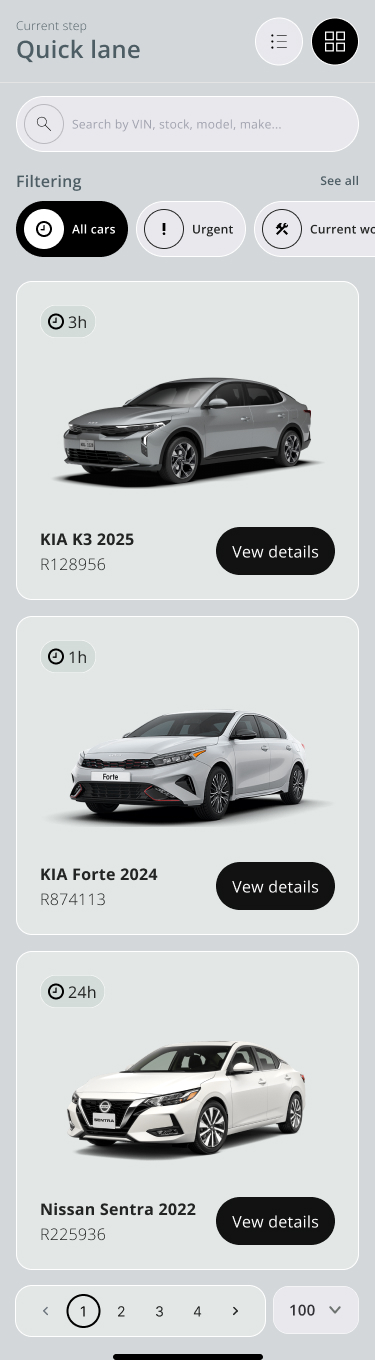
Operational signals lead into vehicle context, then into the fields that support progression.
- Operational complexity
- Structured exploration
- Design judgment
- Refinement
Quick lane
KIA K3 2025
R128956
KIA Forte 2024
R874113
Nissan Sentra 2022
R225936
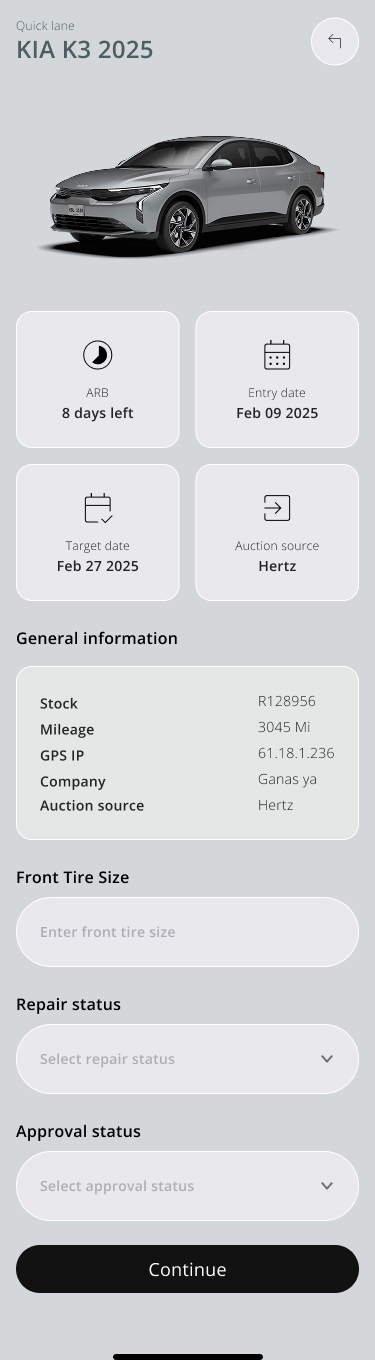
KIA K3 2025
General information
- Stock
- R128956
- Mileage
- 3045 Mi
- Company
- Ganas ya
07 / BUILDING CONSISTENCY
Complex workflows need
predictable patterns.
A token-based Design System connected information-heavy screens through consistent foundations, reusable patterns and predictable operational interactions.
Action always clear.
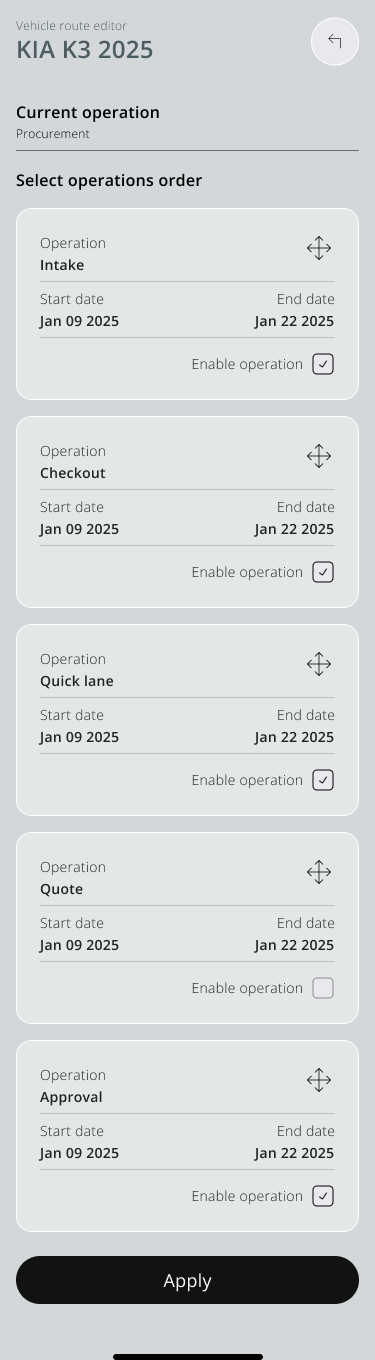
Intake ✥
Dark neutral
Primary action
Apply / Continue
Structured tokens + reusable patterns + predictable interactions.
A foundation for a more consistent product as the operation evolves.
08 / ONE VEHICLE, ONE OPERATIONAL VIEW
One vehicle.
One operational view.
Identity, status and timing.
Operational information.
A clear next action.
See what needs attention.
Vehicle identification and time in stage at the point of entry.
Keep the context together.
Timing, general information and operational fields around one vehicle.
Make progression explicit.
Ordered operations and enabled states make the next step understandable.
09 / FROM OVERVIEW TO ACTION
The right level of information
at the right moment.
The product does not give every detail equal weight. Teams move from what is happening, to what needs attention, to what they need to do next.
10 / AI AS A SUPPORTING TOOL
Support for exploration.
Judgment stays with design.
ChatGPT supported selected content exploration, visual ideation and early design thinking. Product strategy, workflow structure, UX decisions, system decisions and final interface design remained designer-led.
11 / IMPACT
A clearer operational picture.
Centralized visibility
One connected product brings vehicle context together across the operation.
Clearer responsibility
Ownership and required actions are easier to understand.
More predictable workflow
Vehicle progression follows a structured lifecycle.
Better decision context
Status, timing and operational information can be evaluated together.
Scalable interface foundation
Tokens and reusable patterns support consistency as the product evolves.
12 / REFLECTION
Complexity doesn’t need more screens.
It needs better structure.
Operational complexity cannot always be removed. The Product Design challenge is deciding what teams need to see, when they need to see it and how responsibility and actions remain understandable as the operation changes.
Vehicle QA reinforced the importance of designing around the real process rather than forcing complex work into generic tools.