01 / TRICONET / INTERNAL OPERATIONAL PLATFORM
Making a legacy platform understandable to the people who run the business.
Triconet supported a large part of Tricolor’s commercial operation: leads, customer interactions, credit, financing, inventory, sales and team performance. Lead Generation, BDC, Sales and their leads and managers depended on it.
My work began with understanding how this extensive system worked, then how each department used it. The redesign reorganized necessary complexity around real workflows, responsibilities and permissions.
02 / ACCUMULATED COMPLEXITY
The complexity was real.
The structure wasn’t.
Years of incremental additions had created a powerful legacy platform. Each department’s requests added functionality, information and business logic that the operation genuinely needed.
Navigation and discovery had become difficult. Teams encountered functionality they did not need, while some sensitive actions were available too broadly. An outdated, inconsistent UI compounded the problem.
Only a small number of people understood the system end-to-end. One Lead Developer held the deepest knowledge of how it worked.
03 / SYSTEM MAPPING
Before redesigning the interface,
I mapped the system behind it.
I worked closely with the Lead Developer in multiple sessions to understand what each area did, where functionality lived, what actions meant and how workflows connected.
Extensive flows, annotations and a functional glossary made that knowledge explicit. This was the foundation for design decisions: understanding the underlying operation before changing its interface.
- 01
Lead
- 02
Contact
- 03
Follow-up
- 04
Credit application
- 05
Pre-approval
- 06
Vehicle
- 07
Financing
- 08
Down payment
- 09
Sale
Customer context
Lead status · Customer history · Calls · Documents
Vehicle context
Inventory · Status · Lots · Reservations
Commercial context
Agent ownership · Sales · Performance · Bonuses
Areas, connections and workflow dependencies.
Where information lived and what actions did.
Terminology tied to the functions it described.
04 / USER DISCOVERY
First, how the system worked.
Then, how people actually used it.
With a working understanding of Triconet, I spoke with leads and users from Lead Generation, BDC and Sales.
We examined the information they needed, actions they performed, workflow pain points, unnecessary functionality, sensitive actions and missing capabilities that could make daily work easier.
Understand the lead.
Lead source · New leads · Qualification · Lead status
Keep the conversation moving.
Follow-ups · Calls · Customer history · Lead progression
Move toward a sale.
Credit applications · Pre-approvals · Vehicle selection · Inventory · Financing · Down payment · Sale
Oversee the operation.
Performance · Sales · Bonuses · Permissions · Operational oversight
05 / INFORMATION ARCHITECTURE
The goal wasn’t to remove complexity.
It was to stop exposing everyone to all of it.
The business logic remained necessary. I reorganized functionality around departments, responsibilities and workflows so people could focus on their work without learning the entire platform.
- 01+
Right information
The context needed for the task.
- 02+
Right actions
Functionality relevant to the work.
- 03+
Right role
Access aligned with responsibility.
- 04↗
Right moment
Information and actions within the workflow.
06 / ROLES & PERMISSIONS
One platform.
Access shaped by responsibility.
Role-based and permission-based access was introduced where appropriate. Sensitive or high-impact actions could be restricted to Leads or Managers, while teams retained the information and actions relevant to their responsibilities.
Connected operational context
Leads · Customers · Credit · Financing · Inventory · Sales
Department workflows
Information and actions organized around the work each team performs.
Appropriate authority
Restricted to Leads or Managers where needed.
07 / PRODUCT IMPROVEMENTS
Reorganize what existed.
Address what was missing.
Conversations with the teams revealed capabilities they did not yet have. The redesign went beyond navigation and visual modernization.
New capabilities were introduced where real operational needs showed an opportunity to simplify daily work or remove unnecessary friction.
08 / DESIGN SYSTEM & UI
Complex workflows need predictable patterns.
The legacy UI was outdated and visually inconsistent. Modernization supported the deeper restructuring: a dedicated UI Design System brought reusable components, consistent states and predictable interaction patterns to a complex operational environment.
Confirm this action
Review the information before continuing.
Reusable components
Common controls reduce unnecessary variation.
Consistent states
Actions, selections and feedback speak the same language.
Shared visual language
Color and hierarchy connect different areas of the product.
THE REDESIGNED EXPERIENCE
Different workflows.
A shared interaction language.
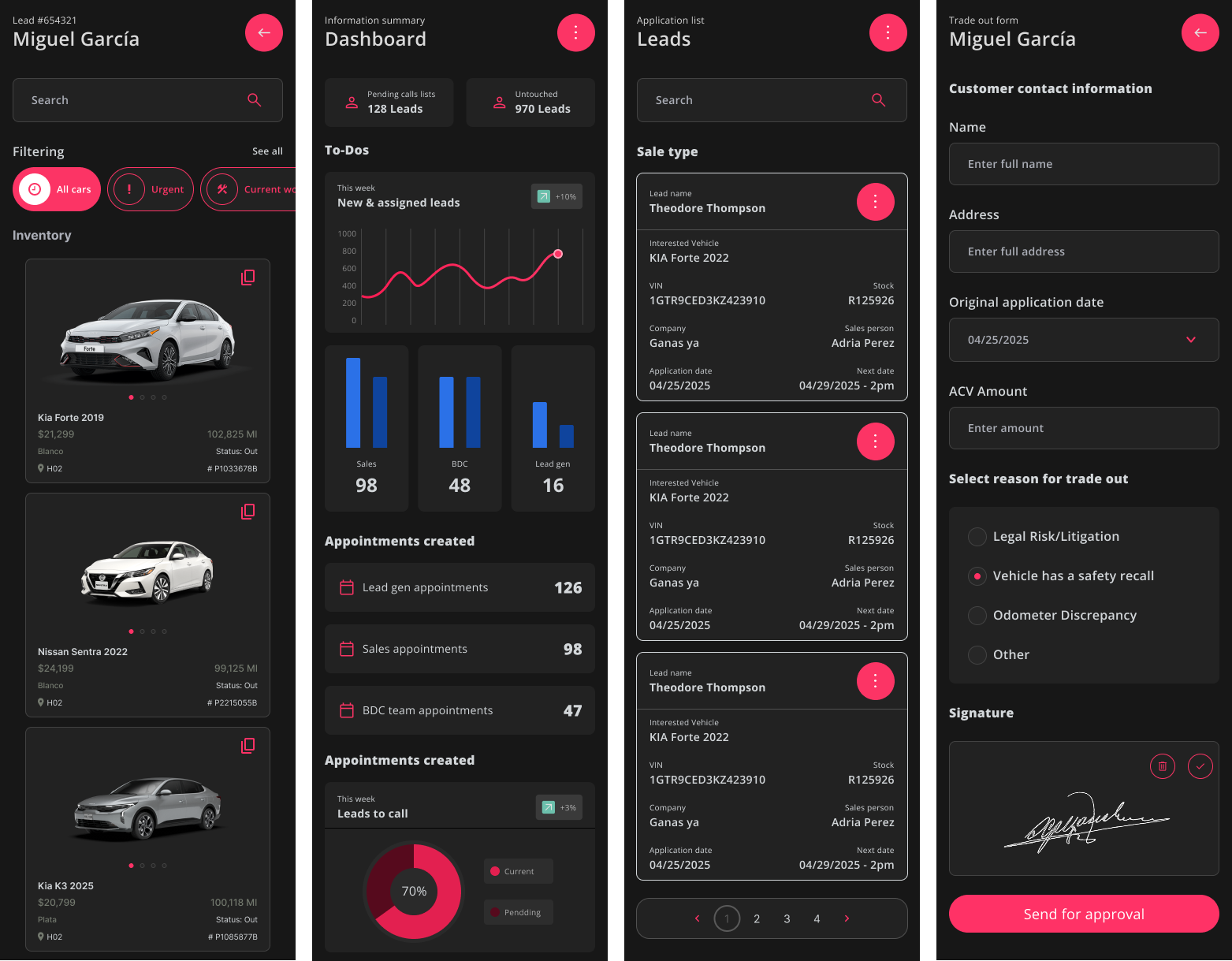
Selected mobile interfaces
within the broader platform.
Lead records
Customer, vehicle and salesperson information in context.
Activity & performance
Calls, assigned leads, sales and appointments.
Vehicle inventory
Vehicle information, status and lot context as part of the commercial operation.
09 / ITERATION & VALIDATION
Reviewed together.
Refined before moving forward.
The redesign evolved through recurring sessions with users and leads. We reviewed progress, validated workflows, gathered feedback, discussed changes and obtained approvals before moving forward.
- 01
Review progress
- 02
Validate workflows
- 03
Gather feedback
- 04
Refine solutions
- 05
Get approvals
10 / OUTCOME
Complexity didn’t disappear.
It became understandable.
Easier navigation
A clearer structure made information and functionality easier to find.
Better daily usability
Relevant information and actions supported day-to-day work and operational performance.
A shorter learning curve
New employees no longer faced the same extensive training burden to learn where work lived.
Role-aware access
Teams could focus on their responsibilities, with sensitive actions restricted where appropriate.
THE TAKEAWAY
A system people no longer needed to understand entirely just to do their job.
The difficult work was understanding and documenting a large legacy platform, then understanding the people working inside it.
Visual modernization mattered. But the deeper change was a structure that made the operation easier to navigate, use and learn.